All posts in Interface3 News

Cosmic Reactor by Interface3

We promise that this will be the final week in a row this happens: but we have another game to announce as in production! We are proud to announce our third multiplayer learning game for iOS and Android: the intergalatic, multi-topic test of skill and reaction times for kids aged 5+ – Cosmic Reactor!

Playing as one of several zany extraterrestrials, kids compete to come out on top across a series of unique reaction tests based around numeracy or literacy. From rearranging numbers through to answering true/false questions, there’s variety across the entire game – and teachers will be able to customise it to suit any particular lesson plan.

Cosmic Reactor will be available as two distinct apps, Words and Numbers: the former featuring vocabulary practice and the latter dealing exclusively with maths. It means we can cram more of each topic into the app, and allows for directed learning in the classroom or at home – so nobody’s sneaking in word games during Maths class!

Planet Select Concept

(click to enlarge)

We’ve created the game, from scratch, for two players on a single tablet device, and it features more of a competitive edge than the collaborative-flavoured games we have already announced. Despite this, we still think it’s a lot of fun, and we feel both can coexist in educational harmony. Both competition and collaboration have their individual plus points, making the app an ideal companion piece to collaborative stablemates Smash Party and Equator.

As with Equator, we’re putting a lot of work into the characterisation of Cosmic Reactor – the funky aliens and their matching home planets will no doubt have favourites picked out by kids, and replay value is guaranteed by the competitive edge the game offers. As an innovation-embracing company, we don’t want to stick to a single successful formula, and Cosmic Reactor allows us to build upon what children have learnt together in a fun interactive app.

Cosmic Reactor will be released on iPad and Android tablets this August. Microsoft PixelSense and SMART Table versions are also in development. Keep your eyes peeled for our character design contest – the winner will have their character featured in the final game!

Download the press release (.doc)

Read more…

The Macallan Microsoft Surface – The World’s Most Whisky-Friendly Table

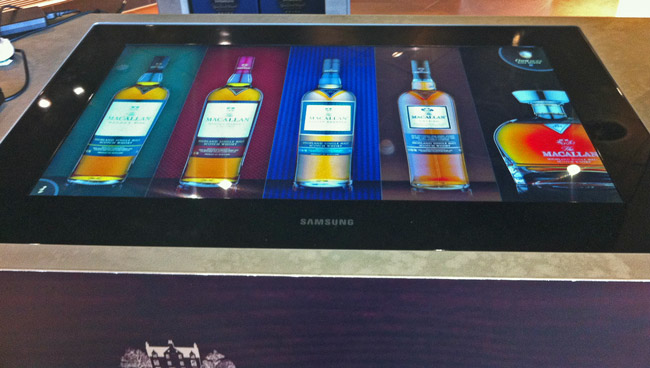
Very recently, veteran Interface3 coder Chris Davies popped over to Schiphol Airport in the Netherlands to install a very special table in the Finest Spirits and Cigars store, located in the middle of the travel centre’s bustling shopping area. The table in question is a Microsoft Surface, a huge touchscreen computer designed to be used as a horizontal table – albeit one packed with a lot of amazing and useful gadgetry.

In this case, we were installing a Surface in the casing of a display stand for world-renowned whisky distillery The Macallan, which comissioned us to create an application featuring information, videos and other interactive goodies related to their award-winning, travel-store-exclusive 1824 Collection range of single malts. Now that it’s finished, installed and live, we can talk about it for ourselves!

Thanks to the technology inside the Microsoft Surface 2.0, the application can actually recognise which drink an inquisitive customer has placed on the table and display relevant info directly alongside it, be it tidbits and factoids about the brewing process or relevant YouTube videos. There’s even tasting notes from The Macallan itself, guiding buyers through choosing their ideal whisky – all of this inside a stand with enough room left for the entire 1824 Collection to sit in several times over!

The Macallan Microsoft Surface by Interface3

(click to enlarge)

On-hand information is always useful if a curious buyer wants to find out more about a potential purchase and possibly lead to an informed sale – but this, naturally, is why the installation exists. The Surface and its amazing range of technology allow for a very impressive and richly-presented way of delivering information, and this reflects The Macallan’s brand message of premium quality – and we’re very pleased to have worked on the application on their behalf. You can find the Macallan 1824 Collection Surface stand in the Finest Spirits and Cigars store at Schiphol Airport for the foreseeable future.

We’ve done more work with Microsoft Surface in the past. Check out the Interface3 Apps Portfolio for more.

Read more about our work!

Equator

Another week, another game to announce! Today, in simulataneous development with our other projects, we’re proud to announce Equator, a collaborative maths game for two players. Ideal for playing with friends or in one-to-one lessons in the classroom, Equator will promote everything from the most basic maths use right up to more advanced techniques, catering for kids aged 5 and up.

Testing early versions here at Interface3, even we’ve had some great fun playing this game for ourselves – and we think this is because it’s our most game-like learning app yet. This is because we’ve opted to wrap Equator in a fun backstory and unique art style, turning a maths practice app into a richly presented co-operative videogame.

EQUATORCONCEPT

(Click to enlarge)

Equator is a game which is all about balance – players win by working together to create individual maths equations which have the same answer. No match means no progress, meaning co-operation and communication are essential in order to progress – especially when, say, one player is adding numbers and the other is subtracting them instead!

The concept art featured here should indicate the direction we’re taking Equator in to ensure that it’s not only educational but genuinely appealing, and we have found from play-testing both in the office and at local schools that children and grown-ups alike are happy with the direction we’ve chosen – and they are especially taken with the game characters and their interchangeable hats!

We’re itching to show you more of Equator alongside our other projects, and we’re especially excited about what the game means for us. It’s one of our first steps into creating learning apps with unique and genuine character – and we hope this makes our games especially endearing to one and all.

Equator will be released towards the end of August for iPad and Android. SMART Table and Microsoft Surface versions are also in development. Subscribe to our newsletter for all of the latest news on the game!

Read more…

SMART Notebook Widget - Interface3 Timer Stopwatches

Because producing a great range of educational games for use on iPads and other tablet devices isn’t quite enough, we at Interface3 are big fans of any and all devices which aim to improve the learning experiences of children, inside and outside of the classroom. That’s why we’ve recently been working on some free widgets for the SMART Notebook whiteboard app currently being used by large numbers of teachers in an ever-growing number of schools across the world, and we’re ready to share them with the world.

As in any learning environment, there will be times where kids will have to put the iPads down and take part in class-wide activities, be it group exercises, word jumbles or other independent work. With this in mind, the SMART board widgets we’ve created – which can be downloaded, for free, right now – are simple ideas with simple, but effective execution.

The first of our widgets, available in two styles, is a simple stopwatch and timer for a multitude of uses. The clock can either count up, for the timing of exercises, or count down to zero. It can be set to sound an alarm when time runs out, and can even be set to skip to the next page of a SMART Notebook – ideal for timed class tests!

SMART Notebook Widget - Interface3 WordBreaker

Our second, just-released widget is a “word breaker”, which distributes the letters of an entered word on a SMART Notebook page. The letters can be distributed in order or randomly, making the widget ideal for creating interactive word jumble/anagram exercises.

These three widgets can be downloaded for free right now from the SMART Exchange website, with the only pre-requisite being that a free account is required. SMART Widgets: just another useful teaching tool from Interface3.

If you use any of our widgets in class, let us know! Get in touch, Tweet us or post on our Facebook wall.

Announcing Smash Party!

After a long time spent planning and working away on it, we’re very excited to finally announce a brand new collaborative multiplayer game: the accessible, super-slick and feature-packed Smash Party! We’re looking forward to sharing a lot of new details about the game with you soon, but here’s a rundown of what to expect from the new title when it launches this July for iPad and Android.

Smash Party is inspired by our own game I Have, Who Has, which we released last year. But make no mistake – it’s such a different and expanded game that we’ve seen fit to give it a new name. Almost everything about this four-player game is so fresh, clean, tidy, refined and improved that to list everything would take all day: new menus, new in-game graphics, three brand new game modes, new things to learn, new bonus features, new customisation options…you get the idea.

The game’s eight topics – unveiled over the coming weeks – all revolve around the classic concept of ‘loop cards’: the idea being that players will take turns to read out questions, and one of them will have the answer. Loop cards keep kids on their toes, using their brains to work out the answers to the questions and springing up when their numbers come up. In Smash Party, four players gather around the iPad or Android device, each side representing a player’s quarter of the game board. Players take turns to ask questions out loud, randomly generated to keep gameplay fresh, and the player with the correct answer sitting in their area must answer in order to move everybody onto the next round together. An extra Time Attack mode tasks players to answer as many questions as they can in a limited time, further elevating the challenge!

Smash Party Early Screenshot

An early screen of Smash Party in action!

We believe Smash Party is great fun for use as a learning tool in the classroom and as a party game for kids, because it encourages co-operation and communication in order to succeed, and using these skills effectively reaps the best rewards in the form of new and more challenging rounds. Expanding upon I Have‘s original maths curriculum, Smash Party will have  which require further use of numeracy skills and even literacy skills – stay tuned for more news on those very soon. We want this game to be a fun challenge for kids of ages 5 and up, and will have details of how the game will be adjusted to different age groups closer to the time of release.

We’ll have more details on the game soon, but we hope this has intrigued you a little. If you want an idea of what to expect from Smash Party, you can download I Have, Who Has completely free on the App Store.

Smash Party will be released in late July for iOS and Android!
We are also working on bringing the game to Microsoft Surface and SMART Tables.

Read more…

Interface3 Games Newsletter

As we prepare to announce everything that we’re working on next, we know a number of you are very busy hard-working teachers and parents who don’t have the time to keep an eye on our Facebook, Twitter and blog feeds. With lovely people like you in mind, we’ve had an idea, and we present it to you thusly: the Interface3 Games Newsletters!

Our newsletter is split into two opt-in emails: the regular, info-packed Games Newsletter arrives in your inbox packed with the hand-picked latest news from Interface3, whilst the Announcements Newsletter only arrives when there’s something really big and really cool we want to share, like if a game is released or if we cut the price.

Our brand new Games Newsletter is targeted at those with just enough time to skim their inboxes for everything important and interesting; a short, snappy and succinct collection of the week’s game announcements and news – fresh off the press in time for your morning coffee break. Every important story of the week will be compacted into easy-to-digest chunks, with links to the larger blog stories with more information on the games, their features, and their educational benefits. We like to think of it as the front page of a magazine – enough to draw you in, but still telling you what you need to know at a glance.

Subscribing to our newsletters is easy. Simply click here to visit the subscription page, fill in your email address and click “Subscribe”. By default, signing up to the newsletter will sign you up for just the Announcements Newsletter – but if you want to know everything we’re up to, tick the box on the sign-up form to receieve the more regular Games Newsletter. And don’t worry – we won’t share your email address with anybody, we won’t send you any emails you don’t want, and you can unsubscribe, or change the newsletters you receive, at any time.

We have some very big, very cool things just around the corner – and with the Games Newsletter, it couldn’t be easier to learn about them all in one go! Subscribe below!
Read more…

AR Award Nomination

Great news for us today! The AR Summit, held in London on the 13th of June, is an annual conference and exhibition providing an insight into the next year of Augmented Reality technologies – of which we are something of a fan. We’re such big fans, in fact, that the AR Summit 2012 has seen fit to nominate us for an award for Most Innovative Use of AR! We’re very pleased with this nomination, which recognises our hard work in creating AR applications which are easy to use and ultimately useful.

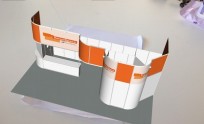
Our recent work for Reed Exhibitions is an iOS app, SmartSpace, which uses AR technology to display the company’s range of exhibition stands on any surface using a special SmartSpace “marker” printed onto paper or card. A variety of stands can be loaded directly from the app, and custom models can be loaded in for use with custom markers too.

Once loaded, the stand can be examined from all angles in 3D by rotating the iOS device around the marker – or the stand can be freely rotated by ‘unlocking’ it from the marker sheet. The colour scheme of the flooring and fascias can also be customised in real-time, so clients can adjust the specification of their ideal exhibition stand in real time. They can then take a snapshot of the model and email it directly to Reed Exhibitions.

We think the SmartSpace app is an extremely useful asset for Reed Exhibitions, and we’re very happy that the AR Summit thinks so too. We’re hoping we win the award!

You can view the full list of AR Summit Award nominations at the AR Summit website.

Recently we’ve found ourselves in demand as schools across both Scotland and England are enlisting the skills of our awesome Kate to learn how to program.

We’ve worked with pupils in the famous Cedars (Greenock) where we helped the pupils design an app that allowed them to create their own certificates. Kate has also ran workshops in Birmingham and London.
It is great to see so many teachers enthusiastic to see their students able to get some programming skills.

Next Up.
Kate is hoping to visit George Watson’s College and Sciennes Primary School in Edinburgh very soon to share her skills some more.
Very exciting.

This weekend, the Interface3 team was over in Glasgow for Culture Hack Scotland.

In the last blogpost, we talked a little bit about the concept. In this blogpost, I wanted to shed a bit more light about the design process and offer some insights into how we managed to pull it all together.

To refresh everyone: we developed an interactive experience based on Edwin Morgan’s Stobhill. It was designed to be dark and immersive: reimagining Morgan’s poem for the 21st Century and hopefully opening it up to new audiences that poetry normally wouldn’t reach.


Why this project?

When we first looked at the dataset a few days before the hackday, I noticed that the archives of some of Edwin Morgan’s poetry was available. My first experience with Morgan’s work was at school, during our Higher English class, with the beautifully written Stobhill. Up until then, I always thought poetry was just clever people, writing in rhymes, about the world. Then out of nowhere, came this provoking piece of storytelling in the most unusual form. It made a big impact on me as a teenager. On asking around the office, it appears several of us had the same experience. For literature that made such an impact on us, we wanted to see whether we could retell the story in an interactive, immersive manner.

Read more…

This weekend, most of the Interface3 team is at the Culture Hack Scotland event being held in Glasgow.

Most of us are working on a project which contains the retelling of Edwin Morgan’s Stobhill poems over a 3D computer ‘gaming’ experience. It’s Silent Hill 2 mashed with classic Scottish poetry.

Our experience is set in now derelict Stobhill Hospital, made famous for the Baby X incident. A girl is ‘dared’ to go into hospital, guided only by her talking teddy bear.

The player explores Stobhill Hospital and uncovers the story depicted by Morgan’s poem through abandoned tapes and notes. As you progress through the hospital though, strange things start happening, and the walls between the hospital and the poet’s imagination begin to break down. Be careful; you might not be alone … 

We spent Friday night working up the level design where we worked out what pieces of the poem.

On Saturday, it’s all about designing the levels in 3D and getting the dialogue and sounds in the game. It’s all go go go, at the moment.

As a project, it’s pretty unique. We thought we would take this opportunity to work on something completely different to what we normally do. For a start, it’s the first 3D project we’ve undertaken and secondly, its the first narrative driven interactive experience that we’ve put together.

In order to make the narrative as strong as possible, we are working with local theatre group DropHound to produce this project.

More details to come soon …